
ByteTrending
  • Home
    • About ByteTrending
    • Contact us
    • Privacy Policy
    • Terms of Service
  • Tech
  • Science
  • Review
  • Popular
  • Curiosity
Donate
No Result
View All Result
ByteTrending
No Result
View All Result
Related image for Bedrock Agent Integration

Bedrock Agents & Cross-Account Knowledge

ByteTrending by ByteTrending
March 18, 2026
in Uncategorized
Reading Time: 11 mins read
0
Share on FacebookShare on ThreadsShare on BlueskyShare on Twitter

Related Post

Generative AI inference deployment supporting coverage of Generative AI inference deployment

SageMaker vs Bare Metal for Generative AI Inference Deployment

May 24, 2026
AI agent performance loop supporting coverage of AI agent performance loop

AI Agent Performance Loop: How to Keep AI Agents Reliable After

May 24, 2026

AI Sparsity Hardware: How Hardware Sparsity Can Make Massive AI

May 15, 2026

Cybersecurity Consultant Skills: What Changes for Enterprise AI

May 15, 2026

The AI agent revolution is here, promising to reshape how we work and interact with technology, but building truly intelligent agents requires access to vast amounts of data.

Many organizations operate across multiple Amazon Web Services (AWS) accounts for security, compliance, or organizational structure – a common practice that quickly creates a hurdle when trying to empower AI assistants.

Imagine an agent designed to answer complex business questions; it’s only as effective as the information it can access, and siloed data across AWS accounts severely limits its potential.

Amazon Bedrock offers powerful foundation models and tools for building these agents, while services like Redshift provide robust data warehousing capabilities – a potent combination when utilized effectively. However, connecting these resources isn’t always straightforward when dealing with cross-account environments. This article dives into the complexities of enabling that connection seamlessly and securely, offering a practical solution focused on Bedrock Agent Integration to unlock your organization’s full knowledge potential across all accounts. Ultimately, we’ll demonstrate how to bridge this gap and empower your agents with comprehensive insights.

The Challenge of Distributed Knowledge

Many organizations don’t keep all their valuable data in a single AWS account. This isn’t necessarily due to laziness or inefficiency; it’s often driven by very real and important considerations. Security boundaries are a primary driver – separating sensitive data like financial records or customer PII into distinct accounts limits the blast radius of potential breaches. Compliance requirements, such as GDPR or HIPAA, frequently mandate strict data residency rules that necessitate storage in specific regions or even separate account environments. Finally, team separation; different departments within a large company might operate independently with their own AWS resources for better control and resource allocation – marketing in one account, development in another, etc.

This fragmented landscape presents a significant hurdle when trying to build powerful AI agents using services like Amazon Bedrock Agent Integration. Imagine you want your agent to answer customer questions drawing data from Redshift clusters spread across three different AWS accounts. The agent needs access to that information, but simply granting broad permissions is a massive security risk – essentially opening the floodgates to potentially sensitive data. Traditional IAM approaches become incredibly complex and difficult to manage when dealing with this cross-account dependency chain; ensuring least privilege access becomes an administrative nightmare.

The complexity stems from needing to carefully orchestrate roles, policies, and trusts across accounts. You’re not just granting read access; you’re establishing a secure pathway for the agent, potentially using intermediary services, to query data residing in another environment. This requires a deep understanding of AWS IAM best practices and careful consideration of potential security implications at each step. Failing to do so can lead to over-permissive configurations that compromise your organization’s overall security posture.

Ultimately, the challenge isn’t just about *can* an agent access data across accounts; it’s about doing so *securely* and *efficiently*. The solution needs to balance functionality with robust security controls. As we’ll explore further in this post, enabling Bedrock Agent Integration with cross-account Redshift knowledge bases requires a well-defined strategy and careful implementation, but the payoff – unlocking the full potential of your data for AI – is worth the effort.

Why Data Silos Exist

Why Data Silos Exist – Bedrock Agent Integration

Many organizations don’t store all their data in a single AWS account. This isn’t necessarily due to poor planning; often, it’s driven by legitimate and critical business needs. Imagine a large retail company: sensitive customer payment information might reside in one highly secured account adhering to PCI DSS standards, while marketing analytics data lives in another for easier collaboration among the marketing team. A financial institution might separate production systems from development environments across accounts for security isolation, preventing accidental modifications or breaches impacting live operations.

Compliance regulations frequently mandate data segregation. For instance, organizations operating within Europe must comply with GDPR, which dictates stringent rules regarding personal data storage and processing. To ensure compliance, they may choose to isolate European customer data within a dedicated AWS account—or even region—with specific access controls and monitoring in place. Similarly, industry-specific regulations like HIPAA (for healthcare) often necessitate separate accounts for patient data, limiting who can access it. Attempting to consolidate this data into a single location would introduce significant compliance risks.

Organizational structure also plays a role. Larger companies often have distinct business units or departments, each with its own IT teams and budgets. These units may operate independently, leading them to create their own AWS accounts for greater autonomy and control over resources. Think of a global manufacturing company – the North American division might manage its data in one account while the Asian division manages theirs in another, reflecting regional differences in legal requirements or operational practices. This fragmentation makes it inherently more complex to build AI agents that need to access information from multiple sources.

Introducing the Solution: Cross-Account Access

To unlock the full potential of Amazon Bedrock Agents, organizations often need to tap into structured data residing in repositories like Amazon Redshift. However, maintaining and accessing these resources across multiple AWS accounts can present significant integration complexities. We’re excited to introduce a streamlined solution that allows Bedrock agents to securely access knowledge bases stored within separate AWS accounts – simplifying development and ensuring robust security.

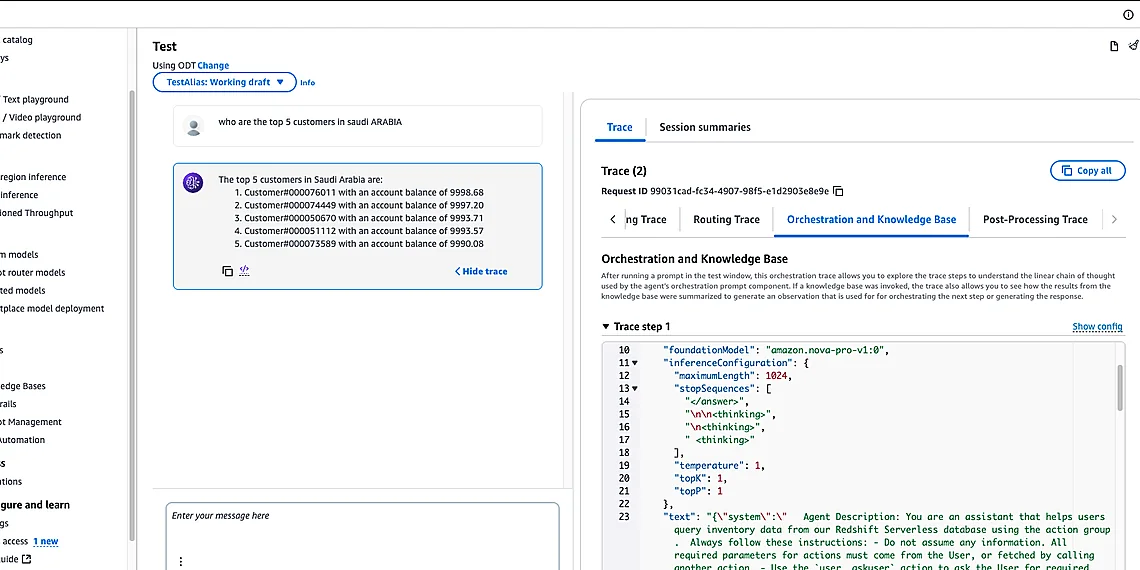
At the heart of this solution lies the seamless interplay between Amazon Bedrock Agents and Amazon Redshift. Bedrock Agents, powered by models like Anthropic Claude or Titan, leverage Knowledge Bases to provide contextually relevant and accurate responses. These knowledge bases are frequently populated with data from structured sources – a perfect fit for Amazon Redshift’s capabilities as a fast, scalable data warehouse. Data Automation components within Bedrock further enhance the process of ingesting and managing this information.

The architecture enabling cross-account access is designed for simplicity and security. It utilizes IAM roles and resource policies to grant agents temporary, limited permissions to query specific Redshift tables in designated accounts. This approach avoids the need to share credentials or create complex network configurations, minimizing potential risks and adhering to best practices for secure data access. Essentially, Bedrock AgentCore orchestrates the interaction, requesting data from Redshift via a well-defined API call with precisely scoped permissions.

This cross-account integration pattern provides a flexible foundation for building advanced AI applications while maintaining strict control over data access. By decoupling agent logic from underlying data storage and leveraging IAM’s granular permission controls, organizations can confidently empower their Bedrock Agents with the knowledge they need without compromising security or operational efficiency.

Bedrock Agents & Knowledge Base Integration

Bedrock agents rely heavily on external knowledge bases to provide accurate and contextually relevant responses. These agents utilize Retrieval Augmented Generation (RAG) techniques, where they first retrieve information from a designated knowledge base – which can be anything from text documents to structured data – and then incorporate that information into the prompt sent to the underlying foundation model. This process ensures that the agent’s answers are grounded in verifiable facts and specific organizational data rather than relying solely on the potentially outdated or incomplete information within the model’s training dataset.

Amazon Redshift is frequently employed as a structured data repository for knowledge bases powering Bedrock agents, particularly when dealing with large volumes of tabular data. Its columnar storage format and query optimization capabilities allow for efficient retrieval of relevant information even from very large datasets. The architecture enables secure access to these Redshift clusters by leveraging cross-account role assumption, ensuring that the agent only accesses the necessary data while adhering to strict security policies.

To simplify the process of connecting agents to knowledge bases and automating data pipelines, Amazon Bedrock offers Data Automation components. These tools streamline tasks such as data extraction, transformation, and loading (ETL) from various sources into Redshift or other supported knowledge base formats. This automation reduces operational overhead and ensures that the knowledge base remains up-to-date with minimal manual intervention.

Technical Deep Dive: Implementation Steps

Implementing cross-account knowledge base access for your Amazon Bedrock Agents involves a few key steps centered around IAM role configuration and resource ARN specification. The core principle is granting the Bedrock agent’s execution role permission to read data from the Redshift cluster residing in another AWS account, without providing broader access. Start by creating an IAM role in the *Redshift* account (the account holding your knowledge base). This role will be assumed by the Bedrock Agent and must have a trust policy allowing the Bedrock agent’s execution role to assume it. A simplified example trust policy for the Redshift role might look like: `{“Version”: “2012-10-17”, “Statement”: [{“Effect”: “Allow”, “Principal”: {“AWS”: “arn:aws:iam::YOUR_BEDROCK_ACCOUNT_ID:role/YourBedrockAgentRole”}, “Action”: “sts:AssumeRole”, “Condition”: {}}]}

, 2] Replace `YOUR_BEDROCK_ACCOUNT_ID` with the actual account ID of where your Bedrock agent resides.

Next, configure a policy attached to this Redshift role that grants read-only access to the specific Redshift cluster and its associated tables. This is crucial for minimizing privilege escalation risk. A basic example of such a policy would be: `{“Effect”: “Allow”, “Action”: [“redshift:DescribeCluster”, “redshift:DescribeTable”, “redshift:GetQueryResults”, “redshift:ExecuteStatement”], “Resource”: [“arn:aws:redshift:::cluster:“, “arn:aws:redshift:::table///

“]}`. Remember to substitute ``, ``, ``, ``, `` and `

` with the correct values for your Redshift cluster.

In the *Bedrock* account, you’ll need an IAM role that Bedrock Agents will assume. This role needs to trust the Redshift role created in the previous step. The trust policy on this role allows it to assume the Redshift role using its ARN. The next crucial piece is configuring your Bedrock Agent (either within Prompt Flows or AgentCore) to specify the ARN of the cross-account Redshift role during knowledge base configuration. This ARN will be used by the agent when accessing data from Redshift. This connection process essentially tells Bedrock, ‘To access this knowledge base, assume this role in this other account’. The agent’s execution environment then uses these credentials to query the remote Redshift cluster securely and efficiently. It is also essential to ensure that your VPC configuration allows outbound traffic to the Redshift cluster’s network address range (if applicable).”, 3] “Finally, test your setup thoroughly by triggering a Bedrock Agent interaction that relies on data from the cross-account knowledge base. Monitor CloudTrail logs in both accounts for any access denied errors or unusual activity, which can indicate misconfigured permissions.”

IAM Roles & Permissions Configuration

IAM Roles & Permissions Configuration – Bedrock Agent Integration

To enable your Bedrock agent to securely access data in a Redshift cluster residing in another AWS account, you’ll need to configure Identity and Access Management (IAM) roles in both accounts. The first role is created within the Bedrock agent’s AWS account. This role will assume a second role in the Redshift account, granting read-only permissions specifically for querying the Redshift data. This approach minimizes privilege escalation and follows the principle of least privilege.

The IAM policy attached to the Bedrock agent’s role (let’s call it `BedrockAgentRole`) must include a trust relationship allowing it to assume the Redshift account’s role. A simplified example policy would look like this: `{ “Version”: “2012-10-17”, “Statement”: [ { “Effect”: “Allow”, “Action”: “sts:AssumeRole”, “Resource”: “arn:aws:iam::RESHIFT_ACCOUNT_ID:role/RedshiftDataAccessRole” } ] }`. Replace `RESHIFT_ACCOUNT_ID` with the actual account ID of your Redshift cluster. This policy allows `BedrockAgentRole` to assume the role named `RedshiftDataAccessRole` in the target account.

In the Redshift account, you’ll need an IAM role (e.g., `RedshiftDataAccessRole`) that grants read-only access to your Redshift cluster. The attached policy should restrict permissions to only what’s necessary for querying. An example policy snippet: `{ “Version”: “2012-10-17”, “Statement”: [ { “Effect”: “Allow”, “Action”: [“redshift:DescribeCluster”,”redshift:GetClusterCredentials”], “Resource”: “arn:aws:redshift:*::/*” }, { “Effect”: “Allow”, “Action”: [“redshift:ExecuteStatement”], “Resource”: “arn:aws:redshift:*:::database//schema//*” } ] }`. Again, replace placeholders with your actual Redshift cluster name and database/schema details. This ensures the Bedrock agent can only read data, not modify it.

Benefits and Future Implications

The Bedrock Agent Integration approach, enabling agents to access knowledge bases spread across multiple AWS accounts, unlocks significant advantages for organizations leveraging generative AI. Primarily, it eliminates data silos, allowing agents to draw upon a broader and more complete picture of organizational knowledge – whether that’s sales data in one account or product documentation in another. This expanded context dramatically improves agent performance, leading to more accurate responses, better decision-making capabilities, and ultimately, more valuable outputs for users. Beyond improved accuracy, this architecture simplifies complex workflows by consolidating information retrieval into a unified process.

The benefits extend beyond just enhanced data access; the simplified management aspect is crucial. Previously, connecting agents across accounts required intricate networking configurations and custom code – a time-consuming and error-prone endeavor. This new approach streamlines that process significantly, allowing developers to focus on building agent logic rather than wrestling with infrastructure complexities. IAM roles provide granular control over access permissions, ensuring that agents only retrieve the data they are authorized to see, bolstering overall security posture and compliance efforts.

Looking ahead, we can anticipate even more sophisticated cross-account integration capabilities within Bedrock. Potential developments include automated knowledge base discovery across accounts, allowing agents to dynamically identify and leverage relevant information without explicit configuration. Further enhancements might involve support for more diverse data sources beyond Redshift, expanding the scope of accessible knowledge. We also foresee tighter integrations with other AWS services like Kendra or SageMaker, creating a comprehensive AI-powered ecosystem.

Finally, it’s important to consider scalability and security as this architecture matures. The design inherently supports scaling to accommodate growing data volumes and user demand through Redshift’s robust capabilities. Security remains paramount; the reliance on IAM roles ensures least privilege access, preventing unauthorized data exposure. Future integrations might include automated compliance checks or even integration with AWS Audit Manager for enhanced auditing and governance.

Beyond the Basics: Scalability & Security

The architecture designed for Bedrock Agent Integration with cross-account Redshift knowledge bases is inherently scalable to handle increasing data volumes and user demand. Leveraging Amazon Redshift’s massively parallel processing (MPP) capabilities ensures efficient querying even as the underlying data grows. Furthermore, Bedrock’s managed infrastructure automatically adjusts resources based on usage patterns, minimizing manual intervention and ensuring consistent performance for agents accessing this distributed knowledge.

Security remains paramount in any multi-account environment, and this integration solution prioritizes it through the use of IAM roles. Each Redshift cluster’s access is strictly controlled by an IAM role assumed by the Bedrock agent. This granular control limits exposure to only necessary data and actions, adhering to the principle of least privilege. The centralized management of these IAM policies simplifies auditing and enhances overall security posture across accounts.

Looking forward, we anticipate further enhancements in cross-account integration within Amazon Bedrock. Potential future developments may include simplified configuration options for connecting to other AWS services like S3 or DynamoDB residing in different accounts, as well as automated discovery mechanisms to streamline the knowledge base onboarding process. These advancements will continue to reduce operational overhead and unlock even greater value from distributed data assets.

The ability to seamlessly tap into knowledge dispersed across multiple accounts represents a significant leap forward in building truly intelligent and adaptable AI agents. We’ve demonstrated how connecting your Bedrock Agents to cross-account resources unlocks unprecedented potential for personalized responses, deeper insights, and ultimately, more effective automation. This approach moves beyond the limitations of isolated data silos, empowering your agents with a comprehensive understanding of your entire organization’s expertise. The future of agent development clearly involves expanding their reach and knowledge base, and this solution provides a powerful foundation for that journey. Successfully implementing Bedrock Agent Integration allows you to build more robust and reliable AI solutions that truly understand the nuances of your business needs. We believe this capability will quickly become essential for organizations looking to maximize the value of generative AI. To dive deeper into the technical details and explore practical implementation examples, we encourage you to check out our comprehensive resources on AWS. Learn how to configure access, manage permissions, and optimize your workflows – your journey to building smarter agents starts here: https://aws.amazon.com/bedrock/agent-integration/ and https://docs.aws.amazon.com/bedrock/latest/devguide/cross-account-access.html. We’re excited to see what you create!

Explore the possibilities and unleash the full potential of your AI agents today.


Source: Read the original article here.

Discover more tech insights on ByteTrending ByteTrending.

Share this:

  • Share on Facebook (Opens in new window) Facebook
  • Share on Threads (Opens in new window) Threads
  • Share on WhatsApp (Opens in new window) WhatsApp
  • Share on X (Opens in new window) X
  • Share on Bluesky (Opens in new window) Bluesky

Like this:

Like Loading…

Discover more from ByteTrending

Subscribe to get the latest posts sent to your email.

Related Posts

Generative AI inference deployment supporting coverage of Generative AI inference deployment
AI

SageMaker vs Bare Metal for Generative AI Inference Deployment

by Lucas Meyer
May 24, 2026
AI agent performance loop supporting coverage of AI agent performance loop
Popular

AI Agent Performance Loop: How to Keep AI Agents Reliable After

by ByteTrending
May 24, 2026
AI sparsity hardware supporting coverage of AI sparsity hardware
Popular

AI Sparsity Hardware: How Hardware Sparsity Can Make Massive AI

by ByteTrending
May 15, 2026
Next Post
Related image for AI agents

Mastering AI Agents: 5 Keys to Success

Leave a ReplyCancel reply

Recommended

Related image for Ray-Ban hack

Ray-Ban Hack: Disabling the Recording Light

October 24, 2025
Generative Video AI supporting coverage of generative video AI

Generative Video AI Sora’s Debut: Bridging Generative AI Promises

May 5, 2026
Related image for Ray-Ban hack

Ray-Ban Hack: Disabling the Recording Light

October 28, 2025
Related image for Sora 2 limitations

Sora 2’s Guardrails: A Creative Block?

November 15, 2025
Generative AI inference deployment supporting coverage of Generative AI inference deployment

SageMaker vs Bare Metal for Generative AI Inference Deployment

May 24, 2026
AI agent performance loop supporting coverage of AI agent performance loop

AI Agent Performance Loop: How to Keep AI Agents Reliable After

May 24, 2026
AI sparsity hardware supporting coverage of AI sparsity hardware

AI Sparsity Hardware: How Hardware Sparsity Can Make Massive AI

May 15, 2026
Cybersecurity consultant skills supporting coverage of Cybersecurity consultant skills

Cybersecurity Consultant Skills: What Changes for Enterprise AI

May 15, 2026
ByteTrending

ByteTrending is your hub for technology, gaming, science, and digital culture, bringing readers the latest news, insights, and stories that matter. Our goal is to deliver engaging, accessible, and trustworthy content that keeps you informed and inspired. From groundbreaking innovations to everyday trends, we connect curious minds with the ideas shaping the future, ensuring you stay ahead in a fast-moving digital world.
Read more »

Pages

  • Contact us
  • Privacy Policy
  • Terms of Service
  • About ByteTrending
  • Home
  • Authors
  • AI Models and Releases
  • Consumer Tech and Devices
  • Space and Science Breakthroughs
  • Cybersecurity and Developer Tools
  • Engineering and How Things Work

Categories

  • AI
  • Curiosity
  • Popular
  • Review
  • Science
  • Tech

Follow us

Advertise

Reach a tech-savvy audience passionate about technology, gaming, science, and digital culture.
Promote your brand with us and connect directly with readers looking for the latest trends and innovations.

Get in touch today to discuss advertising opportunities: Click Here

© 2025 ByteTrending. All rights reserved.

No Result
View All Result
  • Home
    • About ByteTrending
    • Contact us
    • Privacy Policy
    • Terms of Service
  • Tech
  • Science
  • Review
  • Popular
  • Curiosity

© 2025 ByteTrending. All rights reserved.

%d