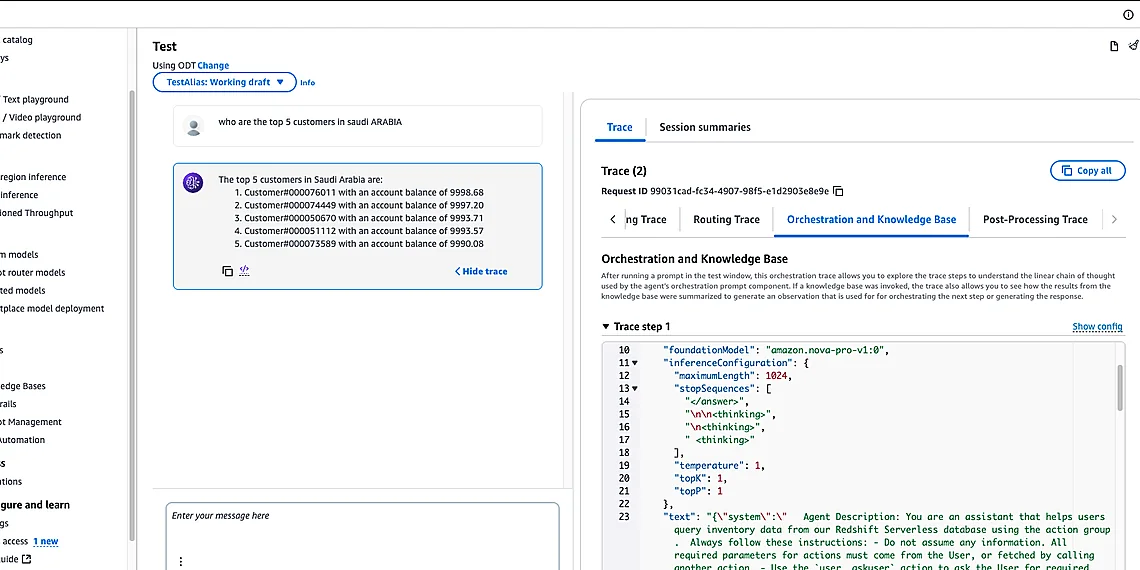



The AI agent revolution is here, promising to reshape how we work and interact with technology, but building truly intelligent agents requires access to vast amounts of data.
Many organizations operate across multiple Amazon Web Services (AWS) accounts for security, compliance, or organizational structure – a common practice that quickly creates a hurdle when trying to empower AI assistants.
Imagine an agent designed to answer complex business questions; it’s only as effective as the information it can access, and siloed data across AWS accounts severely limits its potential.
Amazon Bedrock offers powerful foundation models and tools for building these agents, while services like Redshift provide robust data warehousing capabilities – a potent combination when utilized effectively. However, connecting these resources isn’t always straightforward when dealing with cross-account environments. This article dives into the complexities of enabling that connection seamlessly and securely, offering a practical solution focused on Bedrock Agent Integration to unlock your organization’s full knowledge potential across all accounts. Ultimately, we’ll demonstrate how to bridge this gap and empower your agents with comprehensive insights.
The Challenge of Distributed Knowledge
Many organizations don’t keep all their valuable data in a single AWS account. This isn’t necessarily due to laziness or inefficiency; it’s often driven by very real and important considerations. Security boundaries are a primary driver – separating sensitive data like financial records or customer PII into distinct accounts limits the blast radius of potential breaches. Compliance requirements, such as GDPR or HIPAA, frequently mandate strict data residency rules that necessitate storage in specific regions or even separate account environments. Finally, team separation; different departments within a large company might operate independently with their own AWS resources for better control and resource allocation – marketing in one account, development in another, etc.
This fragmented landscape presents a significant hurdle when trying to build powerful AI agents using services like Amazon Bedrock Agent Integration. Imagine you want your agent to answer customer questions drawing data from Redshift clusters spread across three different AWS accounts. The agent needs access to that information, but simply granting broad permissions is a massive security risk – essentially opening the floodgates to potentially sensitive data. Traditional IAM approaches become incredibly complex and difficult to manage when dealing with this cross-account dependency chain; ensuring least privilege access becomes an administrative nightmare.
The complexity stems from needing to carefully orchestrate roles, policies, and trusts across accounts. You’re not just granting read access; you’re establishing a secure pathway for the agent, potentially using intermediary services, to query data residing in another environment. This requires a deep understanding of AWS IAM best practices and careful consideration of potential security implications at each step. Failing to do so can lead to over-permissive configurations that compromise your organization’s overall security posture.
Ultimately, the challenge isn’t just about *can* an agent access data across accounts; it’s about doing so *securely* and *efficiently*. The solution needs to balance functionality with robust security controls. As we’ll explore further in this post, enabling Bedrock Agent Integration with cross-account Redshift knowledge bases requires a well-defined strategy and careful implementation, but the payoff – unlocking the full potential of your data for AI – is worth the effort.
Why Data Silos Exist

Many organizations don’t store all their data in a single AWS account. This isn’t necessarily due to poor planning; often, it’s driven by legitimate and critical business needs. Imagine a large retail company: sensitive customer payment information might reside in one highly secured account adhering to PCI DSS standards, while marketing analytics data lives in another for easier collaboration among the marketing team. A financial institution might separate production systems from development environments across accounts for security isolation, preventing accidental modifications or breaches impacting live operations.
Compliance regulations frequently mandate data segregation. For instance, organizations operating within Europe must comply with GDPR, which dictates stringent rules regarding personal data storage and processing. To ensure compliance, they may choose to isolate European customer data within a dedicated AWS account—or even region—with specific access controls and monitoring in place. Similarly, industry-specific regulations like HIPAA (for healthcare) often necessitate separate accounts for patient data, limiting who can access it. Attempting to consolidate this data into a single location would introduce significant compliance risks.
Organizational structure also plays a role. Larger companies often have distinct business units or departments, each with its own IT teams and budgets. These units may operate independently, leading them to create their own AWS accounts for greater autonomy and control over resources. Think of a global manufacturing company – the North American division might manage its data in one account while the Asian division manages theirs in another, reflecting regional differences in legal requirements or operational practices. This fragmentation makes it inherently more complex to build AI agents that need to access information from multiple sources.
Introducing the Solution: Cross-Account Access
To unlock the full potential of Amazon Bedrock Agents, organizations often need to tap into structured data residing in repositories like Amazon Redshift. However, maintaining and accessing these resources across multiple AWS accounts can present significant integration complexities. We’re excited to introduce a streamlined solution that allows Bedrock agents to securely access knowledge bases stored within separate AWS accounts – simplifying development and ensuring robust security.
At the heart of this solution lies the seamless interplay between Amazon Bedrock Agents and Amazon Redshift. Bedrock Agents, powered by models like Anthropic Claude or Titan, leverage Knowledge Bases to provide contextually relevant and accurate responses. These knowledge bases are frequently populated with data from structured sources – a perfect fit for Amazon Redshift’s capabilities as a fast, scalable data warehouse. Data Automation components within Bedrock further enhance the process of ingesting and managing this information.
The architecture enabling cross-account access is designed for simplicity and security. It utilizes IAM roles and resource policies to grant agents temporary, limited permissions to query specific Redshift tables in designated accounts. This approach avoids the need to share credentials or create complex network configurations, minimizing potential risks and adhering to best practices for secure data access. Essentially, Bedrock AgentCore orchestrates the interaction, requesting data from Redshift via a well-defined API call with precisely scoped permissions.
This cross-account integration pattern provides a flexible foundation for building advanced AI applications while maintaining strict control over data access. By decoupling agent logic from underlying data storage and leveraging IAM’s granular permission controls, organizations can confidently empower their Bedrock Agents with the knowledge they need without compromising security or operational efficiency.
Bedrock Agents & Knowledge Base Integration
Bedrock agents rely heavily on external knowledge bases to provide accurate and contextually relevant responses. These agents utilize Retrieval Augmented Generation (RAG) techniques, where they first retrieve information from a designated knowledge base – which can be anything from text documents to structured data – and then incorporate that information into the prompt sent to the underlying foundation model. This process ensures that the agent’s answers are grounded in verifiable facts and specific organizational data rather than relying solely on the potentially outdated or incomplete information within the model’s training dataset.
Amazon Redshift is frequently employed as a structured data repository for knowledge bases powering Bedrock agents, particularly when dealing with large volumes of tabular data. Its columnar storage format and query optimization capabilities allow for efficient retrieval of relevant information even from very large datasets. The architecture enables secure access to these Redshift clusters by leveraging cross-account role assumption, ensuring that the agent only accesses the necessary data while adhering to strict security policies.
To simplify the process of connecting agents to knowledge bases and automating data pipelines, Amazon Bedrock offers Data Automation components. These tools streamline tasks such as data extraction, transformation, and loading (ETL) from various sources into Redshift or other supported knowledge base formats. This automation reduces operational overhead and ensures that the knowledge base remains up-to-date with minimal manual intervention.
Technical Deep Dive: Implementation Steps
Implementing cross-account knowledge base access for your Amazon Bedrock Agents involves a few key steps centered around IAM role configuration and resource ARN specification. The core principle is granting the Bedrock agent’s execution role permission to read data from the Redshift cluster residing in another AWS account, without providing broader access. Start by creating an IAM role in the *Redshift* account (the account holding your knowledge base). This role will be assumed by the Bedrock Agent and must have a trust policy allowing the Bedrock agent’s execution role to assume it. A simplified example trust policy for the Redshift role might look like: `{“Version”: “2012-10-17”, “Statement”: [{“Effect”: “Allow”, “Principal”: {“AWS”: “arn:aws:iam::YOUR_BEDROCK_ACCOUNT_ID:role/YourBedrockAgentRole”}, “Action”: “sts:AssumeRole”, “Condition”: {}}]}
, 2] Replace `YOUR_BEDROCK_ACCOUNT_ID` with the actual account ID of where your Bedrock agent resides.
Next, configure a policy attached to this Redshift role that grants read-only access to the specific Redshift cluster and its associated tables. This is crucial for minimizing privilege escalation risk. A basic example of such a policy would be: `{“Effect”: “Allow”, “Action”: [“redshift:DescribeCluster”, “redshift:DescribeTable”, “redshift:GetQueryResults”, “redshift:ExecuteStatement”], “Resource”: [“arn:aws:redshift: