Amazon SageMaker HyperPod offers a powerful solution for scaling distributed AI workloads. Today, Amazon is announcing an exciting new one-click cluster creation experience designed to accelerate setup and prevent common misconfigurations. This advancement ensures you can swiftly launch your distributed training and inference clusters complete with Slurm or Amazon Elastic Kubernetes Service (Amazon EKS) orchestration, Amazon Virtual Private Cloud (Amazon VPC) networking, high-performance storage, and built-in security.
With SageMaker HyperPod, you can efficiently scale tasks like generative AI training, fine-tuning, or inference across clusters with hundreds or thousands of AI accelerators. The system diligently monitors for hardware problems, automatically resolves them, and ensures your workloads recover without manual intervention. Consequently, this greatly simplifies the process of leveraging distributed compute resources.
Accelerating Cluster Creation with One-Click Options
Previously, setting up a SageMaker HyperPod cluster involved manually configuring various AWS resources—including an Amazon S3 bucket, AWS Identity and Access Management (IAM) roles, and VPC settings. This multi-step process presented numerous opportunities for misconfiguration. The new one-click experience simplifies this considerably by creating the necessary prerequisites automatically.
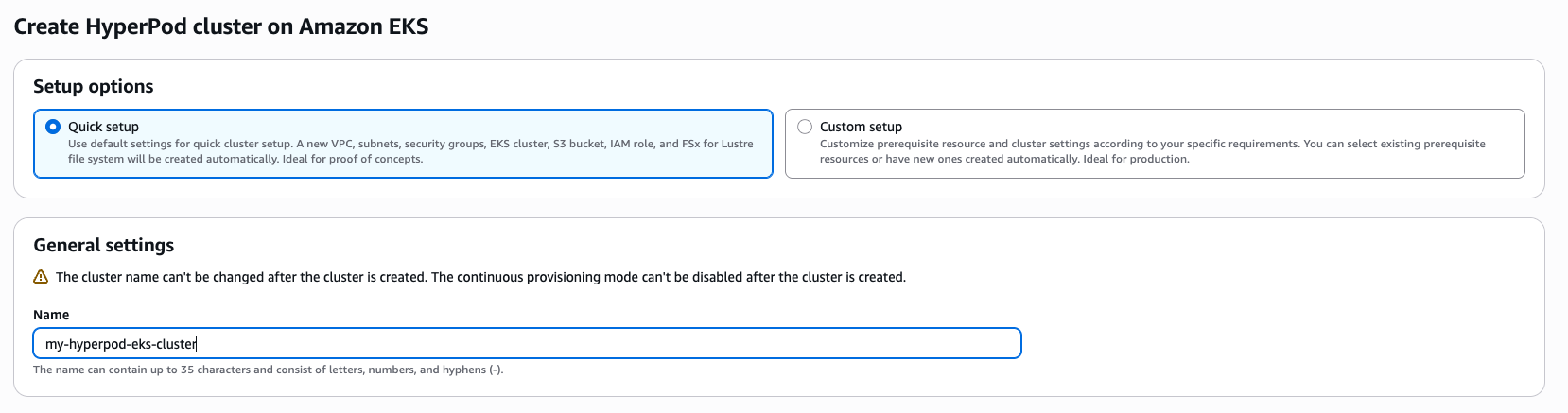
SageMaker HyperPod now provides two deployment options through the AWS Management Console: a quick setup and a custom setup, both accessible from the Amazon SageMaker AI console. For example, users can select between these approaches depending on their level of familiarity with AWS configurations.
Understanding CloudFormation’s Role
At its core, SageMaker HyperPod utilizes AWS CloudFormation to deploy clusters and related resources based on your defined configurations. CloudFormation enables infrastructure as code (IaC), allowing you to define your desired cloud architecture declaratively. This promotes consistency across environments and simplifies managing complex compositions involving managed services like the SageMaker HyperPod cluster.
Exploring the Quick Setup for Simplified Deployments
The quick setup option leverages sensible defaults for instance groups, networking, orchestration, lifecycle settings, permissions, and storage. Therefore, it’s ideal for users who want a fast, straightforward deployment without needing to customize every setting. Notably, users can view which configurations are editable after cluster creation and which would require recreating the underlying AWS resources.
A key advantage of the quick setup is automatic instance recovery; SageMaker HyperPod automatically addresses unhealthy or unresponsive instances, minimizing downtime and ensuring workload resilience. This feature substantially simplifies cluster management, especially for those new to distributed training.
Customizing Your SageMaker HyperPod Environment
For experienced users who require granular control over their SageMaker HyperPod environment, the custom setup option provides full flexibility. This allows you to define every aspect of your cluster configuration, from instance types and networking settings to security groups and storage volumes.
Considerations for Custom Setups
While offering maximum customization, a custom setup requires a deeper understanding of AWS resources and best practices. Users should carefully plan their configurations to ensure optimal performance, scalability, and security. For example, improper network configuration can significantly impact cluster latency.
Conclusion: Simplifying Distributed AI Workloads
The introduction of the one-click cluster creation experience in Amazon SageMaker HyperPod represents a significant step forward in simplifying distributed training and inference clusters. Whether you choose the quick setup for ease of use or the custom setup for maximum control, this update empowers users to harness the power of SageMaker HyperPod more efficiently than ever before.
Source: Read the original article here.
Discover more from ByteTrending
Subscribe to get the latest posts sent to your email.