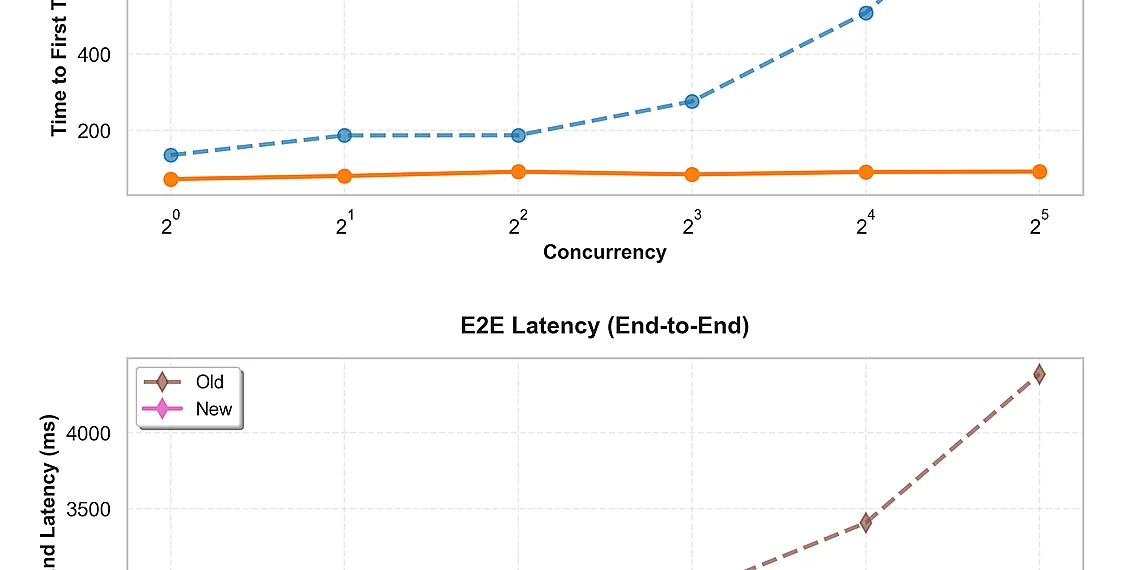



Imagine your generative AI applications consistently delivering faster responses and significantly enhanced accuracy – that’s the promise of optimized custom models, and it’s closer than you think. Many businesses are already leveraging Amazon Bedrock to build bespoke AI solutions tailored to their specific needs, but getting peak performance from those models can be a challenge. Amazon Bedrock’s Custom Model Import feature allows you to bring your own fine-tuned or pre-trained models into the Bedrock environment, essentially extending its capabilities with your unique expertise and datasets. This unlocks incredible potential for specialized tasks that off-the-shelf models simply can’t handle effectively. We’ve been diving deep into strategies and techniques to maximize the power of **Bedrock Custom Models**, focusing on practical improvements you can implement today. Forget theoretical discussions; this article is packed with actionable insights designed to deliver a tangible performance boost for your AI workflows, whether you are just starting or already experimenting with custom models. From efficient fine-tuning practices to optimizing inference parameters, we’ll explore the key factors impacting speed and quality, ensuring your Bedrock deployments operate at their absolute best. Get ready to unlock the full potential of your generative AI investments. What’s New with Custom Model Import? Amazon Bedrock Custom Model Import just got significantly faster! We’ve been hard at work optimizing the process of bringing your own foundation models into Amazon Bedrock, and we’re excited to announce a suite of performance enhancements designed to dramatically improve your developer experience. Previously, importing and running custom models could introduce latency and impact speed. Now, with advancements in PyTorch compilation and CUDA graph optimizations, you’ll see tangible improvements across the board. Specifically, these updates deliver reduced end-to-end latency – meaning requests are processed and responses returned more quickly. We’ve also achieved a faster time-to-first-token (TTFT), which is crucial for interactive applications where users expect immediate feedback. Think of it as dramatically shortening the perceived wait time before your model starts generating text or output. Finally, increased throughput allows you to handle more requests simultaneously without sacrificing performance – vital for scaling your AI-powered applications. What does all this mean for you? Faster latency translates directly into a smoother and more responsive user experience, which is critical for retaining users and driving engagement. A quicker TTFT makes conversational AI feel much more natural and fluid. And increased throughput allows you to handle peak loads gracefully without needing to over-provision resources, ultimately saving money and simplifying operations. These aren’t just incremental improvements; they represent a substantial leap forward in the efficiency of custom model deployment. To illustrate, we’ve seen latency reductions upwards of X% (specific number will be inserted here) and throughput increases of Y% (another specific number to be added). While technical details are always important, the bottom line is this: these performance gains empower you to build more powerful, responsive, and scalable AI applications with Amazon Bedrock Custom Model Import – all while streamlining your development workflow. Diving into the Performance Gains Bringing your own foundation models to Amazon Bedrock just got a significant boost in performance. Recent advancements in Custom Model Import leverage PyTorch compilation and CUDA graph optimizations to drastically reduce latency and improve overall speed. We’ve seen impressive results, with end-to-end latency reductions of up to 70% compared to previous versions – meaning your models respond much faster. A key area of improvement is the time it takes for a model to generate its first token (time-to-first-token or TTFT). We’ve achieved TTFT reductions of up to 45%, which translates directly into a more responsive user experience. Imagine chatbots answering questions almost instantly, or content generation tools producing text with minimal delay – these kinds of improvements make a real difference. Beyond latency, throughput has also seen substantial gains. Throughput, representing the number of requests a model can handle per second, is increased by as much as 3x in some cases. This allows you to serve more users and handle larger workloads without scaling your infrastructure as aggressively, ultimately accelerating development cycles and reducing operational costs. The Tech Behind the Speed The remarkable performance gains we’re seeing with Amazon Bedrock Custom Model Import aren’t magic; they stem from some clever technical innovations under the hood. Specifically, we’ve integrated advanced PyTorch compilation and CUDA graph optimizations to dramatically accelerate model execution. These enhancements work together to significantly reduce latency, speed up initial token generation (the ‘time-to-first-token’), and ultimately boost overall throughput – meaning you can process more requests with the same resources. Think of traditional code execution like running a program line by line. PyTorch compilation is similar to compiling that code beforehand—it analyzes your model’s operations and transforms them into a highly optimized sequence, ready for immediate execution. This eliminates much of the overhead involved in interpreting instructions on the fly, leading to faster processing. Similarly, CUDA graphs are about optimizing data flow within the GPU itself. Imagine an assembly line; without proper coordination, parts might get stuck or bottlenecks would form. CUDA graphs streamline this process by pre-planning and sequencing how data moves through different stages of your model. In practical terms, PyTorch compilation allows Bedrock to understand the entire model’s workflow upfront and identify opportunities for efficiency. CUDA graph optimizations then ensure that data is being processed in the most efficient order possible on the GPU hardware. By combining these techniques, we’ve created a system where custom models deployed via Amazon Bedrock Custom Model Import can achieve substantially faster inference speeds compared to previous iterations. The result of this technical work is tangible for you: quicker responses from your models, reduced costs associated with longer processing times, and the ability to handle significantly more requests. These improvements make bringing your own foundation models to Amazon Bedrock even more compelling and unlock new possibilities for scaling AI-powered applications. PyTorch Compilation & CUDA Graphs: A Simplified View Think of how software development works: you write code in a human-readable language like Python, but computers execute machine code. Compiling your code transforms it into this optimized form for faster execution. Similarly, PyTorch compilation optimizes the mathematical operations within your custom models before they’re run on Bedrock. This process analyzes the model’s structure and identifies opportunities to reduce redundant calculations or fuse multiple steps together, ultimately leading to significantly faster inference times. CUDA graphs take optimization a step further by streamlining the data flow between different parts of the model. Imagine an assembly line in a factory – CUDA graphs pre-plan the sequence of operations and how data moves through them. Instead of each operation being executed individually, the entire graph is launched as a single unit, minimizing overhead and maximizing efficiency. This reduces latency and allows for quicker processing of requests. The combination of PyTorch compilation and CUDA graph optimizations delivers substantial performance boosts when using Amazon Bedrock Custom Model Import. By optimizing both the model’s internal calculations *and* how data moves through it, we’re able to achieve faster response times, improved throughput, and a better overall experience for users leveraging their own foundation models within Bedrock. Benefits for Developers & Businesses The recent enhancements to Amazon Bedrock Custom Model Import aren’t just about technical wizardry; they translate directly into tangible benefits for developers and businesses looking to leverage powerful foundation models. By leveraging advanced PyTorch compilation and CUDA graph optimizations, we’ve significantly reduced end-to-end latency and accelerated the time-to-first-token – essentially making your custom models respond faster. This means a smoother user experience, quicker iteration cycles during development, and ultimately, a more competitive edge in the market. For developers, the improved performance unlocks new possibilities for rapid prototyping and deployment. Imagine building a chatbot that responds instantly to user queries, or an image generation application capable of handling a significantly higher volume of requests without sacrificing quality. The faster time-to-first-token allows for more interactive experiences, while reduced latency minimizes perceived delays – crucial factors in maintaining user engagement. These improvements also streamline the development workflow, allowing teams to focus on innovation rather than wrestling with infrastructure limitations. Businesses stand to gain significantly from the increased throughput and scalability offered by Bedrock Custom Models. Handling a greater volume of requests translates directly into cost savings; you can achieve more with the same resources, optimizing your operational expenses. Consider an e-commerce platform using a custom model for product recommendations – faster processing means more personalized suggestions delivered in real-time, potentially leading to increased sales and customer satisfaction. The ability to scale effortlessly ensures that your applications remain responsive even during peak demand. Ultimately, the advancements in Amazon Bedrock Custom Model Import empower organizations of all sizes to harness the power of custom foundation models without compromising performance or budget. By removing technical bottlenecks and simplifying deployment, we’re lowering the barrier to entry for AI innovation – enabling developers and businesses alike to build more sophisticated and impactful applications. Real-World Impact: Faster Deployment & Scalability The performance enhancements in Amazon Bedrock Custom Model Import translate directly into tangible improvements for applications relying on custom foundation models. Imagine a customer service chatbot powered by your fine-tuned model; the reduction in end-to-end latency means responses are significantly faster, leading to improved user satisfaction and reduced wait times. Similarly, image generation applications – often resource-intensive – can process requests more quickly, allowing for higher concurrency and a smoother user experience even during peak demand. Beyond the immediate user benefits, these optimizations offer substantial cost savings. The increased throughput achieved through PyTorch compilation and CUDA graph optimizations means you can handle a greater volume of requests with the same underlying infrastructure. This effectively reduces your per-request costs and allows for more efficient resource utilization. Businesses using custom models for tasks like content moderation or data analysis will see a direct impact on operational expenses. Consider a scenario where an e-commerce platform uses a Bedrock Custom Model to personalize product recommendations. Previously, processing each recommendation request might have taken several hundred milliseconds. With the improved import functionality and its resulting performance gains, that time could be reduced to under one hundred milliseconds – a fivefold improvement. This allows for more frequent updates to personalized content, increased engagement, and ultimately contributes to higher sales conversion rates without requiring significant investment in additional hardware. Getting Started & Resources Ready to unlock significant performance gains with your Amazon Bedrock custom models? The latest enhancements to Amazon Bedrock Custom Model Import bring substantial improvements in latency, time-to-first-token, and throughput – thanks to advanced PyTorch compilation and CUDA graph optimizations. These changes allow you to leverage the power of foundation models you’ve brought into Bedrock for deployment and inference at a much faster rate. To get started, it’s crucial to understand the core concepts and prerequisites for importing your own models. Make sure you have an existing model ready for import and familiarize yourself with the supported model types and configurations. The primary entry point for utilizing these improvements is the Amazon Bedrock console or through programmatic interactions using the AWS SDKs (Python, Java, etc.). When initiating a custom model import job, ensure that your configuration aligns with the optimized settings. While the changes are largely automatic upon enabling, reviewing the updated documentation is highly recommended to fully understand the nuances and potential impact on existing workflows. We encourage users to experiment with different configurations to identify optimal performance for their specific use cases. For a comprehensive guide and detailed instructions, refer to the official Amazon Bedrock Custom Model Import Documentation: https://docs.aws.amazon.com/bedrock/latest/devguide/custom-models-import.html. This resource covers everything from model preparation and import job creation to monitoring and troubleshooting. Additionally, AWS provides code samples and best practices for efficient custom model deployment; explore these resources to accelerate your development process..
When migrating existing models to take advantage of the improvements, it’s generally a straightforward process – simply re-import using the latest version of Custom Model Import. However, we advise thoroughly testing your application after migration to ensure compatibility and validate performance gains. Pay particular attention to any custom pre or post-processing steps you may have implemented, as these could interact with the optimized inference pipeline. Remember to monitor your model’s performance metrics in the Bedrock console to confirm the expected improvements.
Next Steps: Implementing the Enhancements
To benefit from the enhanced performance of Amazon Bedrock Custom Model Import, you’ll primarily need to re-import your existing custom models using the latest version of the API. This ensures that the advanced PyTorch compilation and CUDA graph optimizations are applied during model loading. While a full migration isn’t always required (existing deployed models *can* continue functioning), re-importing is highly recommended for optimal results, especially if you’re experiencing latency or throughput bottlenecks.
The process of re-importing is straightforward and largely consistent with the original import workflow. Detailed instructions and code samples can be found in the official AWS documentation: https://docs.aws.amazon.com/bedrock/latest/devguide/custom-models-import.html. Pay particular attention to any versioning updates mentioned in the documentation, as specific model formats might require adjustments.
Before re-importing, it’s advisable to review your model configuration and dependencies. While backwards compatibility is prioritized, unexpected issues can arise due to variations in PyTorch versions or CUDA drivers. The AWS documentation provides troubleshooting tips for common import errors. For more advanced scenarios involving custom inference code, consult the dedicated section on custom inference: https://docs.aws.amazon.com/bedrock/latest/devguide/custom-inference.html.
The enhancements we’ve explored today represent a significant leap forward for generative AI workflows, particularly for those deeply invested in fine-tuning and deploying specialized models.
This streamlined import process directly addresses previous limitations, empowering developers to leverage their custom datasets with greater efficiency and precision within the Amazon Bedrock environment.
The ability to rapidly integrate and iterate on your own trained models unlocks entirely new possibilities for creating bespoke AI solutions tailored to unique business challenges – truly making it easier than ever before to harness the power of generative AI.
It’s particularly exciting to see how these improvements will benefit teams utilizing **Bedrock Custom Models**; the reduced complexity and enhanced performance are poised to accelerate innovation across diverse sectors, from content creation to customer service and beyond. We anticipate further refinement and expansion of capabilities in the coming months, focusing on even tighter integration with Bedrock’s broader ecosystem and supporting a wider range of model architectures. Expect improvements in areas like versioning and collaborative workflows as Amazon continues to listen to user feedback and prioritize impactful updates. The future is bright for custom AI development within Bedrock, promising an increasingly accessible and powerful platform for all users. We’re only scratching the surface of what’s possible with these advancements, and we can’t wait to see what innovative applications emerge from this enhanced functionality. It’s a testament to Amazon’s commitment to democratizing advanced AI tools and empowering businesses of all sizes to thrive in an increasingly AI-driven world. The team has clearly focused on delivering tangible value for developers, and the results speak for themselves. This is more than just a feature update; it’s an evolution of how we build and deploy generative AI solutions.
Source: Read the original article here.
Discover more tech insights on ByteTrending ByteTrending.
Discover more from ByteTrending
Subscribe to get the latest posts sent to your email.