ByteTrending
  • Home
    • About ByteTrending
    • Contact us
    • Privacy Policy
    • Terms of Service
  • Tech
  • Science
  • Review
  • Popular
  • Curiosity
Donate
No Result
View All Result
ByteTrending
No Result
View All Result
Home Curiosity
Related image for voice assistant

How to Build a Multilingual AI Voice Assistant

ByteTrending by ByteTrending
October 6, 2025
in Curiosity, Tech
Reading Time: 3 mins read
0
Share on FacebookShare on ThreadsShare on BlueskyShare on Twitter

How to Build a Multilingual AI Voice Assistant

Get hands-on with creating your own multilingual AI voice assistant! We heard about ElevenLabs’ AI voice assistant from one of our board members, Chris Mairs, so we thought we’d invite him to write the introduction for this post, which goes on to explain how you can build your own using Raspberry Pi. This project offers a fascinating entry point into conversational AI.

Chris: I’m one of the board members at Raspberry Pi, and I first got introduced to ElevenLabs when I started a free weekly blog this summer: The Open Eyed Man.

The blog explores life as a blind man in a visual world, with an optimistic view on how AI — and, in particular, conversational voice agents — could be transformative. ElevenLabs kindly invited me to create a clone of my own voice in their recording studio, and there is now a personalized audio narration using that scarily realistic clone at the top of each The Open Eyed Man post. I’d love people to take a look or a listen, and to subscribe and share; the content is often lighthearted, but hopefully insightful and accessible to non-technical readers.

Related Post

robotics supporting coverage of robotics

How CES 2026 Showcased Robotics’ Shifting Priorities

April 2, 2026
robot triage featured illustration

Robot Triage: Human-Machine Collaboration in Crisis

March 20, 2026

ARC: AI Agent Context Management

March 19, 2026

Partial Reasoning in Language Models

March 19, 2026

And don’t worry — the conversational assistant that Thor from ElevenLabs shows you how to build below absolutely does not use the clone of my voice. There are far more mellifluous and cheery options.

Building Your Own AI Voice Assistant

Thor Schaeff’s setup enables you to run ElevenLabs’ conversational AI model on a Raspberry Pi, making it function as an AI assistant that can answer your questions completely hands-free. Building your own voice assistant provides unique customization options and a deeper understanding of AI technology.

If you want to skip the video and go straight to the code, here’s the GitHub repo

Essential Components for Your Raspberry Pi Voice Assistant

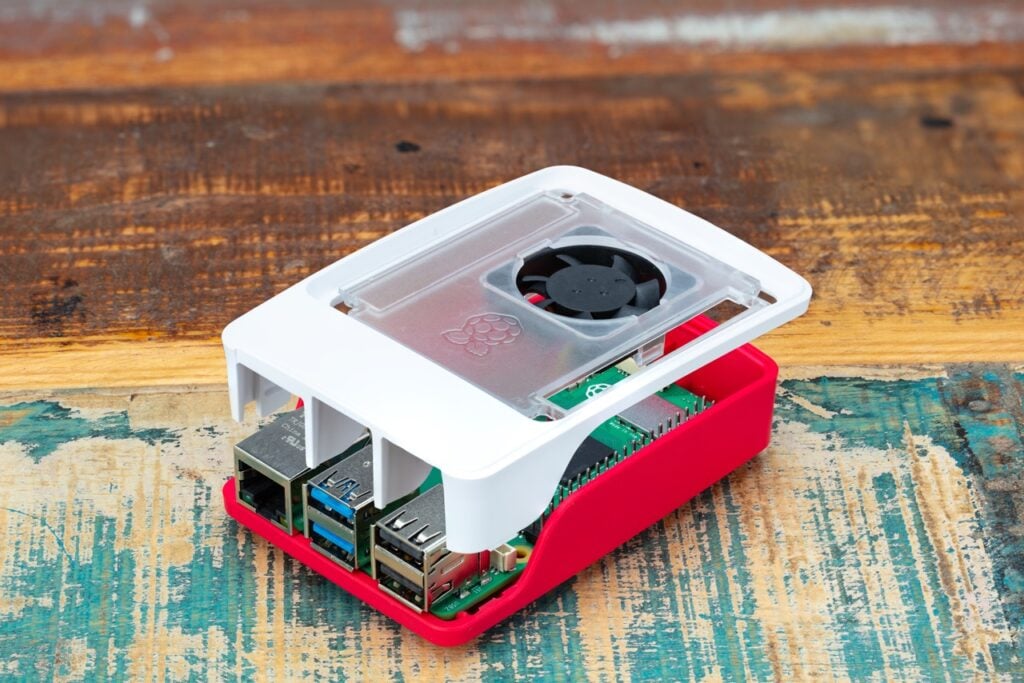
To embark on this exciting project, you’ll need a few key components. Firstly, a Raspberry Pi is required; a Raspberry Pi 5 or similar model would work best due to its processing power. A small microphone and speaker are also essential for interacting with your new voice assistant, although a Bluetooth speaker with a built-in microphone is a convenient choice.

Kit List

  • A Raspberry Pi (Raspberry Pi 5 or similar would work best for crunching this amount of data)
  • A small microphone and speaker (Thor chose a Bluetooth speaker with a built-in microphone)
  • Python 3.9 or higher installed on your Raspberry Pi
  • An ElevenLabs account with an API key

Multilingual Customization Options

Thor’s setup wakes up to the hotword “Hey Eleven,” but you can tailor this to your own preference as you code. His build speaks to him in an American male accent, but you can also choose your own voice option for your AI buddy. The potential for personalization is a key benefit of building your own voice assistant.

Here’s Thor walking you through ElevenLabs’ dashboard during the build video — it all sounds almost impossibly simple!

Furthermore, the AI model is multilingual, meaning it can respond to you in a language of your choosing. Notably, there’s a fun discussion on X about what languages people are testing it in, highlighting the versatility of this voice assistant.

In addition to being customizable and multilingual, building your own AI voice assistant with Raspberry Pi is a fun project for those interested in exploring the world of conversational AI. Therefore, with ElevenLabs’ powerful models and Thor’s clear instructions, you can create a personalized assistant that responds to your commands in multiple languages!

Conclusion

Creating your own multilingual AI voice assistant is an achievable project for enthusiasts who want to explore the possibilities of conversational AI. It combines hardware (Raspberry Pi), software (Python, ElevenLabs API), and a bit of creativity. Ultimately, this endeavor offers both educational value and the satisfaction of having a personalized, hands-free digital companion.


Source: Read the original article here.

Discover more tech insights on ByteTrending.

Share this:

  • Share on Facebook (Opens in new window) Facebook
  • Share on Threads (Opens in new window) Threads
  • Share on WhatsApp (Opens in new window) WhatsApp
  • Share on X (Opens in new window) X
  • Share on Bluesky (Opens in new window) Bluesky

Like this:

Like Loading...

Discover more from ByteTrending

Subscribe to get the latest posts sent to your email.
Tags: AIRaspberryPiVoiceAssistant

Related Posts

robotics supporting coverage of robotics
AI

How CES 2026 Showcased Robotics’ Shifting Priorities

by Ricardo Nowicki
April 2, 2026
robot triage featured illustration
Science

Robot Triage: Human-Machine Collaboration in Crisis

by ByteTrending
March 20, 2026
agent context management featured illustration
Review

ARC: AI Agent Context Management

by ByteTrending
March 19, 2026
Next Post
Related image for ai-poc

The Nine Rules of AI PoC Success

Leave a ReplyCancel reply

Recommended

Related image for PuzzlePlex

PuzzlePlex: Evaluating AI Reasoning with Complex Games

October 11, 2025
Related image for Ray-Ban hack

Ray-Ban Hack: Disabling the Recording Light

October 28, 2025
Related image for Ray-Ban hack

Ray-Ban Hack: Disabling the Recording Light

October 24, 2025
Kubernetes v1.35 supporting coverage of Kubernetes v1.35

How Kubernetes v1.35 Streamlines Container Management

March 26, 2026
SpaceX rideshare supporting coverage of SpaceX rideshare

SpaceX rideshare Why SpaceX’s Rideshare Mission Matters for

April 2, 2026
robotics supporting coverage of robotics

How CES 2026 Showcased Robotics’ Shifting Priorities

April 2, 2026
Kubernetes v1.35 supporting coverage of Kubernetes v1.35

How Kubernetes v1.35 Streamlines Container Management

March 26, 2026
RP2350 microcontroller supporting coverage of RP2350 microcontroller

RP2350 Microcontroller: Ultimate Guide & Tips

March 25, 2026
ByteTrending

ByteTrending is your hub for technology, gaming, science, and digital culture, bringing readers the latest news, insights, and stories that matter. Our goal is to deliver engaging, accessible, and trustworthy content that keeps you informed and inspired. From groundbreaking innovations to everyday trends, we connect curious minds with the ideas shaping the future, ensuring you stay ahead in a fast-moving digital world.
Read more »

Pages

  • Contact us
  • Privacy Policy
  • Terms of Service
  • About ByteTrending
  • Home
  • Authors
  • AI Models and Releases
  • Consumer Tech and Devices
  • Space and Science Breakthroughs
  • Cybersecurity and Developer Tools
  • Engineering and How Things Work

Categories

  • AI
  • Curiosity
  • Popular
  • Review
  • Science
  • Tech

Follow us

Advertise

Reach a tech-savvy audience passionate about technology, gaming, science, and digital culture.
Promote your brand with us and connect directly with readers looking for the latest trends and innovations.

Get in touch today to discuss advertising opportunities: Click Here

© 2025 ByteTrending. All rights reserved.

No Result
View All Result
  • Home
    • About ByteTrending
    • Contact us
    • Privacy Policy
    • Terms of Service
  • Tech
  • Science
  • Review
  • Popular
  • Curiosity

© 2025 ByteTrending. All rights reserved.

%d