
If you’ve already tried GitHub Copilot coding agent, you know the basics: assign a task, let it work in the background, and review the pull request when it’s done.
But what if you’re ready to move beyond the basics?
We got you. In this tutorial, we’ll explore five powerful strategies to integrate the coding agent deeper into your development workflow. From tackling tech debt to validating UI changes and experimenting with branch strategies, let’s unlock Copilot’s full potential.
Let’s go!
1. Offload tech debt with the Agents panel
Tech debt is like weeds in your garden: ignore it, and it spreads everywhere.
You know that pile of “we should really fix this someday” tasks sitting in your backlog? The dependency upgrades, lingering feature flags, small refactors that everyone avoids because they’re boring but necessary?
I used to let those pile up until they became weekend projects. Not anymore.
The new Agents panel lets me batch these tedious-but-important tasks and hand them off to Copilot while I focus on actual feature development.


- Open your repository on GitHub.com and click the Agents panel button.
- Describe your task:
- “Update the extension manifest to support VS Code 1.104”
- “Add TypeScript strict mode and fix all resulting type errors”
- Hit Start task and let Copilot do the rest.
👉 Pro tip: Batch small cleanup tasks into separate requests. Each task only costs one premium request, and you’ll get neatly scoped pull requests you can merge independently.
2. Validate UI changes with Playwright MCP
Front-end changes usually come with a side quest: Spin up the app locally, poke around the UI, and hope nothing’s broken. Copilot’s Playwright MCP server integration changes this completely. It can spin up your application, interact with it, and capture screenshots automatically.
- From the Agents panel, describe the task:
“Add internationalization support for English, French, and Spanish.” - Copilot generates the code, uses the Playwright MCP server to run your app in a browser, and captures screenshots for the pull request.
- Review the screenshots directly in the pull request before checking out the branch locally.
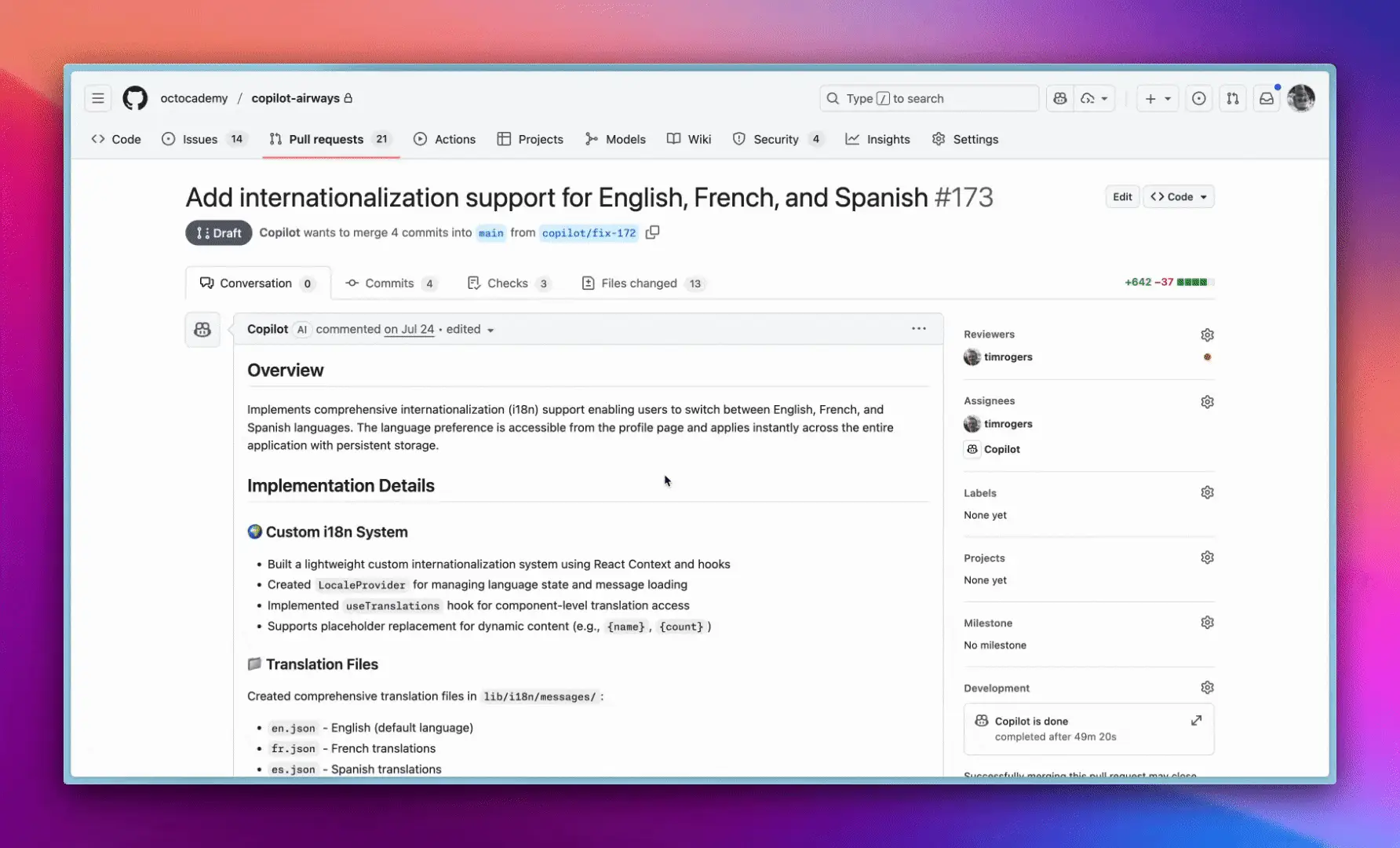
👉 Pro tip: This is great for validating responsive designs, dark mode toggles, or any UI change where a screenshot is worth a thousand code reviews.
3. Experiment safely with branching
Want to try out a new library or architectural pattern but aren’t sure if it’ll work? Use Copilot to spin up a branch and prototype your idea.
- Describe the experiment:
“Create a branch with a micro frontend architecture using Web Components.” - Copilot generates the initial branch structure, including basic boilerplate code.
- Experiment freely without impacting your main codebase!
👉 Pro tip: Use this to quickly test out new technologies or approaches before committing to them.
4. Automate code migrations
Migrating from one technology stack to another can be a major undertaking. Copilot can help automate the process by generating migration scripts and updating dependencies.
- Describe the migration:
“Migrate the codebase from Node.js 16 to Node.js 20.” - Copilot generates a pull request with all necessary changes, including dependency updates and code modifications.
👉 Pro tip: Start small by migrating individual modules or components before tackling the entire codebase.
5. Improve code quality with static analysis
Keep your codebase clean and maintainable by using Copilot to run static analysis tools and identify potential issues.
- Describe the task:
“Run SonarQube on all JavaScript files.” - Copilot generates a pull request with any identified issues, along with suggested fixes.
👉 Pro tip: Integrate static analysis into your CI/CD pipeline to ensure consistent code quality.
By implementing these strategies, you can harness the full power of GitHub Copilot coding agent and take your development workflow to the next level. Ready to get started?
Source: Read the original article here.
Discover more tech insights on ByteTrending.
Discover more from ByteTrending
Subscribe to get the latest posts sent to your email.